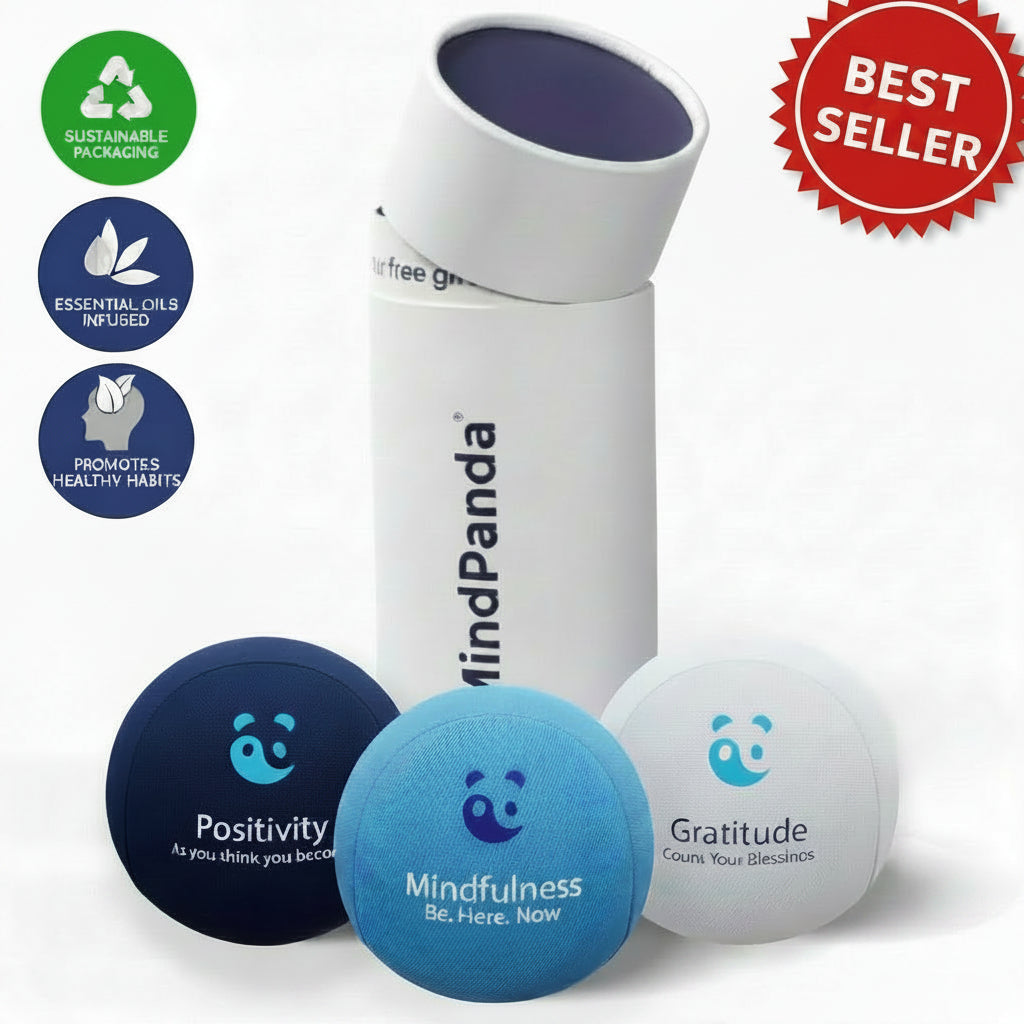
The best fix for a distracted workday isn’t one app. It’s a small stack: control your environment first, add a blocker, run work in timed blocks, and anchor your attention with something physical, like a stress ball or a five-minute journal entry. Start with two or three categories, test them for two weeks, and drop whatever doesn’t earn its spot.
TL;DR:
- A cross-device focus blocker is essential to prevent distraction from both your laptop and phone, with effectiveness rising when all screens are included.
- Focus music is helpful for repetitive tasks but tends to hinder deep work like writing or reading dense materials, so silence may be more effective for those activities.
- Incorporating tactile objects like stress balls or using physical planners can reduce restless energy and improve focus during work sessions.
- Building a firm routine, including goal setting, start rituals, and timed work blocks, is crucial for turning digital tools into lasting habits.
- Environmental control, such as moving your phone out of reach and decluttering your workspace, significantly enhances focus more than relying solely on apps or willpower.
Table of Contents
- Focus Tools for Work: The Digital Layer That Actually Reduces Distraction
- Physical Tools That Make a Focus Session Stick
- Routines That Make Your Focus Tools Actually Work
- Choosing the Right Mix Without Overbuilding Your Stack
- What the Research Actually Says About Staying Focused
- What Actually Holds Up After Testing These Stacks
- Pairing Physical Anchors With Your Focus Stack
- Where This Article’s Recommendations Come From
- Sources
- FAQ
Focus Tools for Work: The Digital Layer That Actually Reduces Distraction
Most people download a focus app, use it twice, and go back to twelve browser tabs. The problem usually isn’t the tool. It’s that nobody set it up to actually block the path back to distraction. A good digital stack has four jobs: keep temptation out of reach, set the mental tone, hold your task list so your brain doesn’t have to, and mark time so a session has a clear start and end.
Blockers remove the decision entirely. Freedom locks distracting sites and apps across your phone, tablet, and computer at once, which matters because a blocker that only covers your laptop is useless the moment you pick up your phone out of habit. Freedom’s own data on cross-device blocking points to a real productivity gain when the block covers every screen you own, not just one.
Focus music and soundscapes work for some tasks and backfire on others. Brain builds audio specifically engineered to support sustained attention rather than just playing ambient noise in the background, and it’s worth using for repetitive or moderately demanding work, like data entry, editing, or coding. For anything that requires reading dense material or writing from scratch, silence usually wins. Test both and pay attention to which one actually gets you through the task faster.
Task managers earn their keep by getting everything out of your head and onto a page you trust. A capture and review system, the kind of structure tools like OmniFocus are built around, works by forcing you through three steps: capture everything as it comes up, prioritize before you start work, and limit how many things are “in progress” at once. That last part matters more than people think. Three open projects at once isn’t multitasking. It’s three unfinished projects competing for the same attention.
Timers give a session a shape. A visible countdown, whether it’s a phone timer or a dedicated Pomodoro app, turns “I should focus” into “I have 45 minutes, starting now.”
Here’s a locked setup that actually holds:
- Turn on your blocker for the full session length, not just “until I get distracted.”
- Put your phone in another room or in a drawer, not face down next to you.
- Set a single visible timer for the whole block.
- Open only the task manager and the one document or tool you need.
- Write down anything that pops into your head on a notepad instead of acting on it.
Pro Tip: Set your blocker before you open your task manager, not after. If the blocker goes on last, you’ve already given yourself a window to check one more thing first.
Physical Tools That Make a Focus Session Stick
Apps handle the digital noise. Your desk and your body handle the rest. A cluttered workspace and a restless body will undercut even a perfectly configured blocker.
Noise-canceling versus noise-masking isn’t a matter of which is better. It’s a matter of which noise you’re dealing with. Noise-canceling headphones work best against steady, low-frequency sound: HVAC hum, traffic, a nearby conversation you can half-hear but not quite ignore. Noise-masking, using something like a fan, white noise, or brown noise, works better in open offices where sound comes and goes unpredictably, because a constant background layer smooths out the sudden changes that pull your attention away. If your problem is one loud coworker, canceling wins. If your problem is an unpredictable open floor plan, masking usually does more.
Tactile anchors sound small but do real work. Fidgeting with a stress ball, clicking a pen, or squeezing something in your hand during a hard mental task gives restless energy somewhere to go that isn’t your phone. This is the same logic behind standing mats and desk risers: a body that has a small, low-stakes outlet for movement is less likely to invent a bigger, more disruptive one, like a “quick” scroll through your phone.
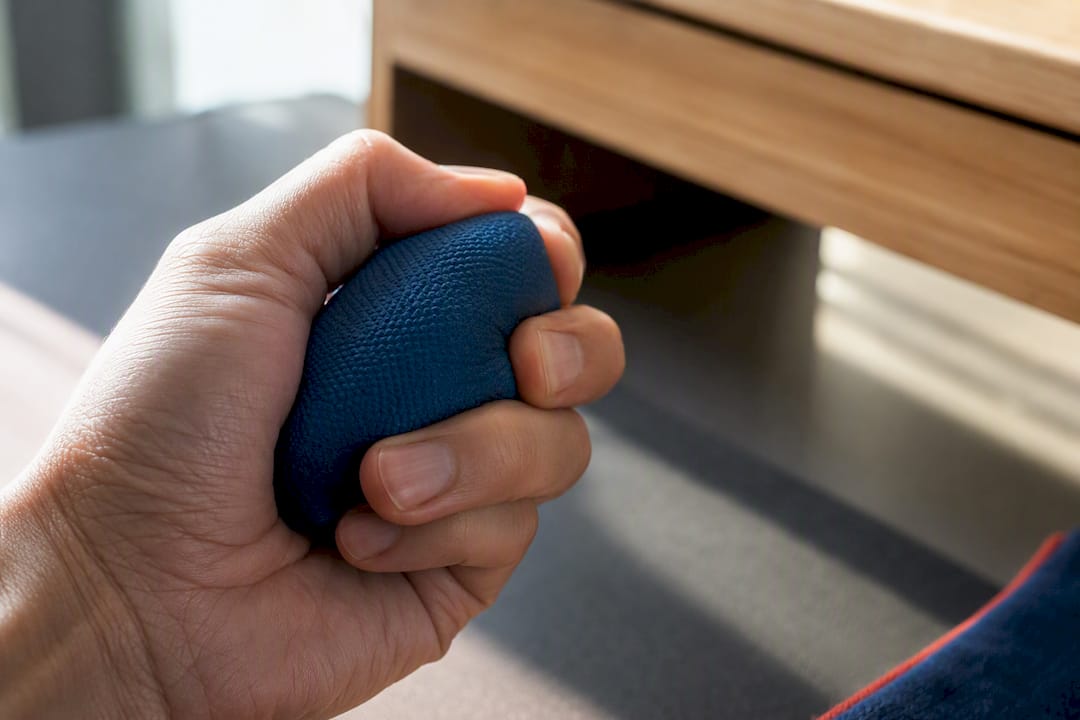
Desk layout matters more than most people budget time for. A desk with three open browser tabs’ worth of physical clutter, papers, extra devices, unrelated notebooks, creates the same kind of friction as a browser with twenty tabs open. Clear it down to what the current task needs and nothing else.
Quick wins that reduce start friction:
- Keep only the current task’s materials on your desk.
- Put your phone in a drawer, not just face down.
- Use a paper planner or checklist as the last thing you look at before starting and the first thing you update when you stop.
- Keep a tactile object within reach so your hands have somewhere to go besides your phone.
A paper planner earns its place here specifically at the transition points. Writing “starting: draft outline, 10:15” and later “stopped: outline done, moving to edit” gives your brain a clean signal that one task ended and another began, which a screen full of open tabs never quite provides.
Routines That Make Your Focus Tools Actually Work
A blocker and a timer without a routine is just noise reduction. The routine is what turns that quiet into actual output.
Here’s a simple template for one focus block:
- Name the goal. One sentence: what does “done” look like for this block?
- Run a start ritual. Three deep breaths, or a short box breathing exercise, signals to your brain that work is starting now.
- Set the timer and the blocker together. Both go on before you open the actual work.
- Work one task only. If something else comes to mind, write it on a notepad and keep going.
- Stop when the timer ends, even mid-sentence. Jot a one-line note on where you left off.
- Take a real break. Stand up, leave the desk, no scrolling.
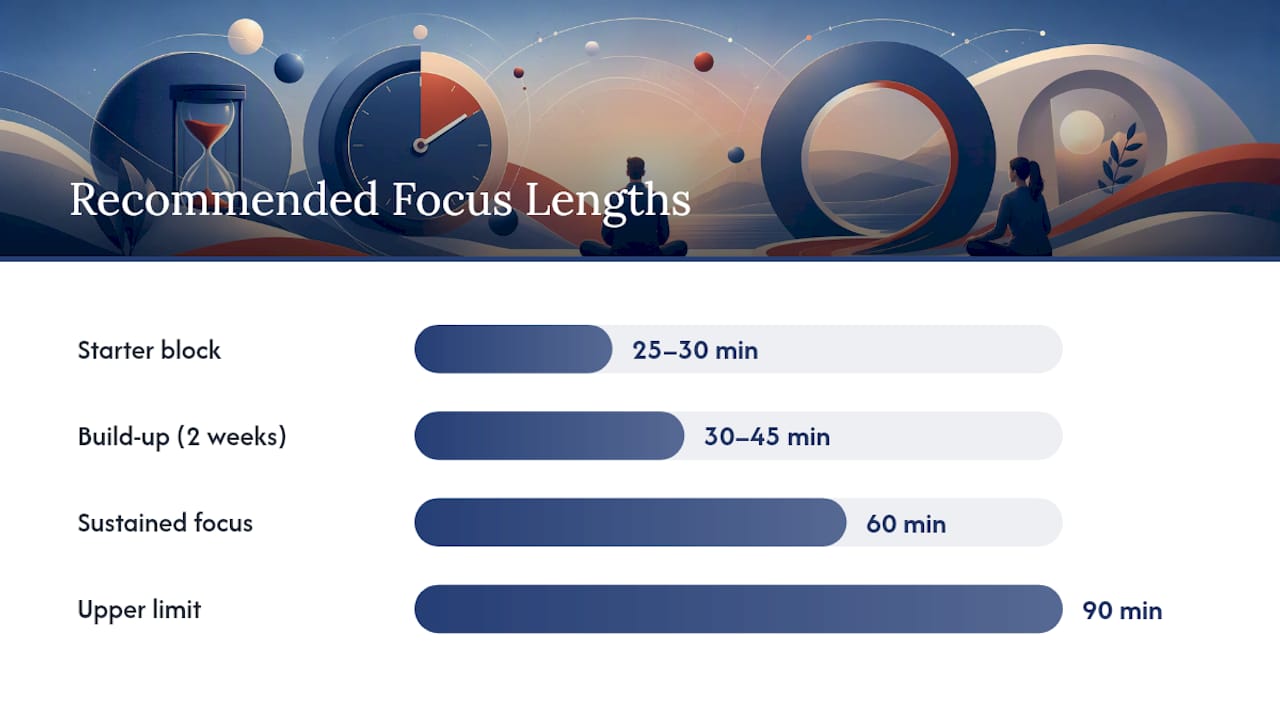
Session length matters more than most advice admits. Starting at 25 to 30 minutes is fine if you’re rebuilding a focus habit from scratch, but the research on ultradian rhythms points toward 60 to 90-minute cycles as the sweet spot for sustained attention once you’ve built up tolerance. Push too long past 90 minutes without a break and output quality drops even if you’re still technically “working.” Build up gradually: two weeks at 30 to 45 minutes, then stretch toward 60, then 90, always followed by a break long enough to actually leave your screen.
Batching shallow work, email, quick replies, scheduling, into set windows keeps it from bleeding into your deep work blocks. Task-switching carries a real cognitive cost: research on interrupted work shows that shifting between unrelated tasks taxes attention more than staying on one thing, which is exactly why batching and time blocking help. Pair this with a team norm, even an informal one, that response times during your blocked hours can wait, as explained in How to Reduce Phone Interruptions in Your Clinic.
Pro Tip: Stack your focus ritual onto something you already do without thinking, like your first coffee or your commute’s end. Habit stacking works because you’re not relying on willpower to remember a new routine; you’re attaching it to one that’s already automatic.
Small pre-commitments help too: tell a coworker you’re heads-down until 11, or block your calendar so meetings can’t land in that window. The commitment does the enforcing so you don’t have to.
Choosing the Right Mix Without Overbuilding Your Stack
More tools rarely means more focus. Past three or four categories, you’re usually managing your tools instead of your work.
Start with a short checklist before adding anything new:
- Task type. Deep writing needs silence and a blocker. Repetitive tasks tolerate music. Admin work just needs batching.
- Interruption risk. High-interruption jobs (support, on-call roles) need a blocker paired with clear team norms more than they need a fancier timer.
- Device ecosystem. A blocker that only covers your laptop is a half-measure if your phone is the real problem.
- Energy rhythm. Save your hardest task for whatever time of day you’re naturally sharpest, and save the tool experiments for lower-stakes hours.
Run a two-week trial before deciding anything’s a keeper. Track two things: how many uninterrupted blocks you actually completed, and a quick 1 to 5 rating of how focused each one felt. That’s a low-effort way to see whether a tool is pulling its weight or just sitting on your home screen.
A tool is working when sessions start faster and you notice fewer “just checking” detours. A tool isn’t working when you spend more time configuring it than using it, or when two tools do the same job and you’re bouncing between both out of indecision. That’s tool overlap, and it’s a common trap: a blocker and a separate “focus mode” app fighting for the same five minutes of setup time before you’ve done any actual work.
What the Research Actually Says About Staying Focused
Willpower is a limited resource, not a personality trait. Stanford Medicine makes the case plainly: trying to resist your phone through sheer discipline works less reliably than removing the phone from the room in the first place.
“Proactive environment control, like physically moving your phone out of reach, is a more effective and durable strategy than relying on willpower alone.” This is the core insight from Stanford Medicine’s research on sustained attention: the fix isn’t a stronger mind, it’s a better-designed environment.
Harvard Health backs this with concrete, low-tech strategies: single-tasking instead of juggling several things at once, choosing quieter environments when you have the choice, and building small habits, like mentally paraphrasing what you just read, that reinforce attention rather than just hoping it holds.
Focus isn’t only an individual problem, either. Slack’s research on deep work points out that protecting concentration works better as a team practice than a solo effort: shared expectations about response times, and scheduled quiet periods where nobody expects an instant reply, take the pressure off any one person to defend their calendar alone.
A short checklist worth actually using this week:
- Move your phone to another room before your next focus block, not just face down.
- Pick one 60 to 90 minute block and protect it with a blocker and a closed door or headphones.
- Tell your team, even informally, when you’re unreachable and for how long.
- Take a real, screen-free break between blocks instead of scrolling “for a minute.”
What Actually Holds Up After Testing These Stacks
Most focus advice treats tools like a substitute for habit. That’s backwards. The blocker, the timer, the tactile object, none of them build focus on their own. What they do is remove enough friction that the habit has a chance to form. Pairing a blocker with a five-minute micro-meditation before the first block of the day, then closing with a quick journal note on what got done, tends to outlast any single app used alone.
The trade-off worth naming honestly: tools help most in the first two or three weeks, when you’re still building the routine and need the external structure. After that, the tool matters less than the ritual around it. Lean too hard on automation, and you can end up needing the app to feel focused at all, which is its own kind of dependency. The goal isn’t a permanent blocker. It’s a habit strong enough that the blocker becomes a backup, not a crutch.
— Ravi
Pairing Physical Anchors With Your Focus Stack
A blocker and a timer handle the digital half of the problem. The physical half, the restless hands, the racing mind between blocks, needs something to hold onto, and that’s where a tactile anchor or a short journaling habit does real work. Some companies build their product lines around exactly that gap: something calming and functional enough to sit on your desk without turning into another notification source.
Start with the stress balls collection if you want a simple hands-on anchor for your next timed block, or look at Mindpanda’s journals and planners if you’d rather close each session with a written note on what got done. The Thrive & Reflect journaling bundle pairs both into a single ritual: a few minutes of reflection to open a work block, a physical object to hold during it, and a page to close it out on. If you’re outfitting a whole team, Mindpanda’s corporate gifting and bulk order options make it easy to hand every desk the same starter kit. Pick one product, pair it with your blocker and timer this week, and see if your next focus block actually holds.
Where This Article’s Recommendations Come From
The routines and tool guidance above draw on a handful of sources worth reading directly if you want the fuller picture.
- Stanford Medicine on why environment control beats willpower for sustained attention.
- Harvard Health on practical, low-tech strategies for focus and memory.
- Slack on how teams can protect deep work through shared norms.
- Brain and Freedom as working examples of focus music and cross-device blocking in practice.
Sources
- How to concentrate in an ever-distracted world: Five things to know — Stanford Medicine
- 4 ways to improve focus and memory — Harvard Health
- Brain
- Freedom — Block distractions across devices
FAQ
How Can I Increase My Focus at Work?
Start with environment control before adding any app: move your phone out of reach, close unrelated tabs, and clear visible clutter from your desk. Layer a blocker, a timed session of 45 to 90 minutes, and a short break on top, since Stanford Medicine’s research shows proactive control outperforms relying on discipline alone.
What Is an Effective App to Help Me Focus on Work?
There isn’t one single winner, since different apps solve different problems. A cross-device blocker like Freedom handles distraction removal, while engineered focus audio from Brain.fm helps with repetitive or moderately demanding tasks where background sound aids concentration.
What Device Can Help Me Focus Better?
Noise-canceling headphones work best against steady background sound, like traffic or HVAC hum, while a white noise machine or fan handles unpredictable open-office noise more effectively. A tactile object, such as a stress ball, also helps by giving restless hands something to do besides reaching for a phone.
What Are the Most Commonly Used Productivity Tools?
The core categories people rely on are app and site blockers, focus timers, task managers for capturing and prioritizing work, focus music or soundscapes, and physical planners or journals for tracking sessions. Most people don’t need all five at once; two or three, matched to the task at hand, is usually enough.
How Long Should a Focus Session Last?
Start at 30 to 45 minutes if you’re building the habit, then work up toward 60 to 90 minute blocks as your tolerance builds, always followed by a real break. Pushing well past 90 minutes without stopping tends to lower output quality even when you feel like you’re still working.